Create a crew space
Open a space in two minutes — choose the outing type, the duration, and share the nine-digit code with your crew.
What you get
A crew space is a shared dashboard: meal grid, provisioning list, galley hand assignments, and boat profile. One nine-digit code gives everyone access — no account required.
Before you start
Decide on the outing type and duration (number of days). You can adjust the duration later from the Meals tab.
Steps
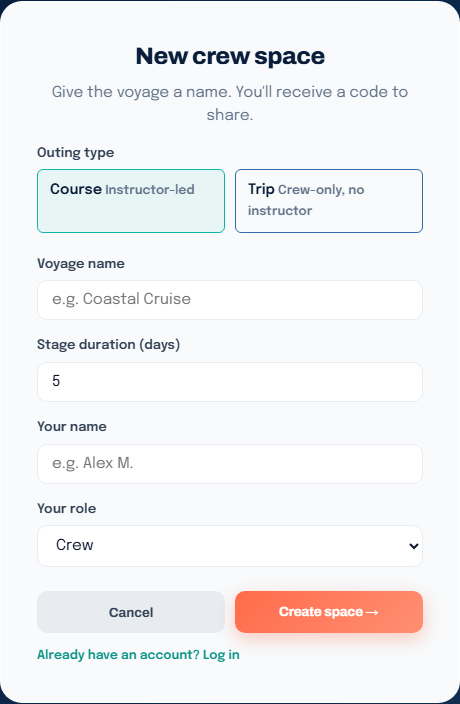
- On the home page, click Create a crew space.
- Choose the type:
- Course — instructor-led outing. The instructor has a distinct role and can leave guidance notes.
- Trip — crew outing with no instructor. Everyone has the same role.
- Give the voyage a name (e.g. "Coastal Cruise") and enter the duration in days (1 to 30).
- Enter your name.
- If you are creating a Course, choose your role: Instructor or Crew.
- Click Create space →.
A nine-digit code appears immediately. Copy it and share it with your crew — it is their access key.
After creation
- Enter the space by clicking Enter space →.
- Share the code by message, email, or QR code (link
/j/{code}/qr). - An account is optional. It only helps you find your spaces from another device.
See also
- Join by code — how a crew member joins the space
- Roles and supervision — Course vs Trip differences